A more flexible Cards view for your pipelines
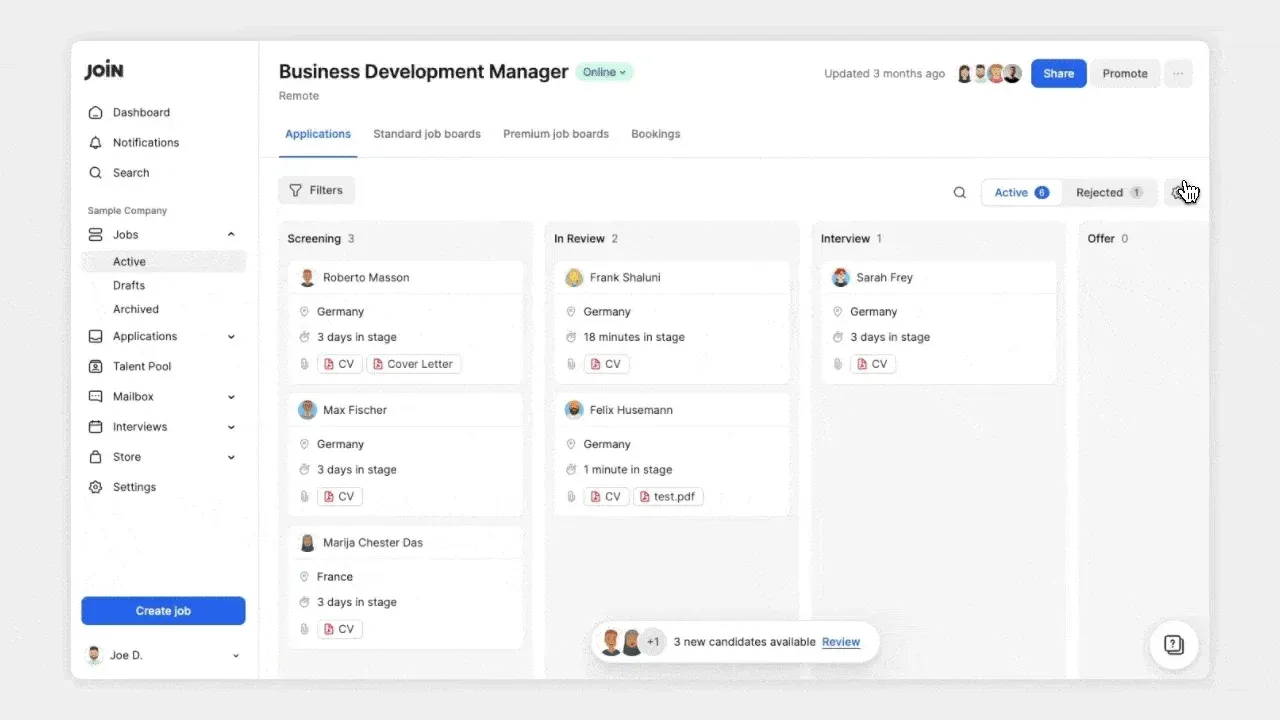
Cards view is where your team manages the hiring pipeline. It’s now been upgraded with more flexibility, better visibility, and quicker actions right where you work. You can now customise your application cards per job and adapt the view to match how you review candidates, organise your pipeline, and take action directly from the board.
Customise what each card shows
Choose which fields appear on your cards and reorder them based on what matters most. Focus on the information you actually use when reviewing candidates who applied to a job.
See time in stage at a glance
Quickly spot candidates who have been waiting too long in a stage, prioritise follow-ups, and drag and drop candidates to the next stage directly from the board. 
Access documents and take action instantly
Open professional links, preview documents, and take actions like reject, undo, add tags, or leave notes directly from the card without opening the full candidate profile. 
Track pipeline health in real time
See how many candidates are in each stage, including active and rejected counts. Numbers update automatically when filters are applied. 