How to track candidates effectively in an ATS: Strategies that speed up hiring
Table of contents
- Why most ATS setups fail recruiters (and how to fix yours)
- Use tags and filters to instantly surface the right candidates
- Create templates and workflows that standardise your hiring process
- Add notes, ratings, and feedback that your whole team can act on
- Sync your ATS with other tools to close collaboration gaps
- How JOIN helps you track, organise, and collaborate on every candidate
Most hiring teams treat their ATS like a searchable inbox. This guide breaks down the practical strategies that turn it into a real collaborative hiring system: smarter tagging, structured feedback, and the workflows that keep hiring moving fast.
Most hiring teams adopt an applicant tracking system with good intentions, and then use it as little more than a searchable inbox. Applications come in, statuses get updated, and candidates move through stages. But the deeper functionality goes untouched. The result: duplicated effort, inconsistent decisions, and recruiting pipelines that slow down precisely when they need to move fast.
Effective ATS candidate tracking strategies go beyond storing applications. They turn your ATS into a shared workspace, one where every recruiter, hiring manager, and interviewer is working from the same information, in real time. Here’s how to make that shift.
Table of contents
- Why most ATS setups fail recruiters (and how to fix yours)
- Use tags and filters to instantly surface the right candidates
- Create templates and workflows that standardise your hiring process
- Add notes, ratings, and feedback that your whole team can act on
- Sync your ATS with other tools to close collaboration gaps
- How JOIN helps you track, organise, and collaborate on every candidate
Why most ATS setups fail recruiters (and how to fix yours)
The problem with most ATS configurations isn’t the software, it’s the absence of structure around how it’s used. When there’s no shared standard for notes, no agreed tagging system, and no template for moving candidates through stages, every recruiter ends up working differently. That inconsistency slows decisions and creates gaps in communication.
A brief internal audit is a helpful starting point, one that looks at how your team currently uses the system and surfaces questions like:
- Where do interview notes live, in the ATS, or scattered across emails and personal documents?
- Are tags applied consistently, or does every recruiter use different labels for the same thing?
- Do hiring managers log feedback in the platform, or does it still happen over Slack or in meetings?
Identifying those friction points gives you a clear map of what to standardise first. LinkedIn’s 2026 Talent Velocity Advantage Report found that 86% of companies lack adequate talent velocity, and 90% of chief people officers are calling for real-time skills visibility. A well-configured ATS is a practical starting point, but only if the team agrees on how to use it.
Use tags and filters to instantly surface the right candidates
Tags are one of the most underused features in any ATS, and one of the most powerful. A well-designed tagging system lets you filter your pipeline instantly, surfacing candidates by skill set, seniority level, location, source, or hiring stage without manually reviewing individual profiles.
The key is keeping your tag library intentional. A long, inconsistent list of tags created on the fly becomes just as useless as no tags at all. Agreeing on a core set of categories up front makes a significant difference in practice.
A practical tagging structure might look like this:
- Role-specific skills: python, b2b-sales, ux-research
- Candidate source: referral, linkedin, job-board
- Availability: immediate, 4-week-notice, passive
- Pipeline flags: strong-culture-fit, revisit-q3, offer-declined
Filters work alongside tags to give hiring managers a cleaner view of the pipeline. Rather than scrolling through an unordered list of applicants, a filtered view can show only the candidates who meet specific criteria, making it far easier to act quickly when a role needs to be filled.
Tags in JOIN can be applied directly from the candidate profile and used to filter across all open roles at once. This is particularly useful when a strong candidate applies for one position but might be a better fit for another, a common scenario in fast-growing teams.
Create templates and workflows that standardise your hiring process
Without shared standards, every recruiter runs their own version of the hiring process. One uses a structured scorecard; another relies on gut feel and a few bullet points. Templates and workflows solve these problems.
A template ensures every candidate is assessed against the same criteria, reducing bias and making it easier to compare objectively. A good template covers: core competencies, structured questions, a consistent rating scale, space for specific observations, and a clear hire/no-hire recommendation.
Workflows define the sequence of stages every candidate passes through and what should happen at each one. Pair that structure with automated prompts (feedback reminders, status nudges, offer-stage notifications) and you reduce admin load while making sure strong candidates don’t get lost in a busy pipeline.
These small automations reduce the administrative load on recruiters and make it less likely that a strong candidate gets lost in a busy pipeline. JOIN’s workflow tools allow teams to customise stages and set up these prompts across all active roles, keeping hiring moving consistently even during high-volume periods.
Add notes, ratings, and feedback that your whole team can act on
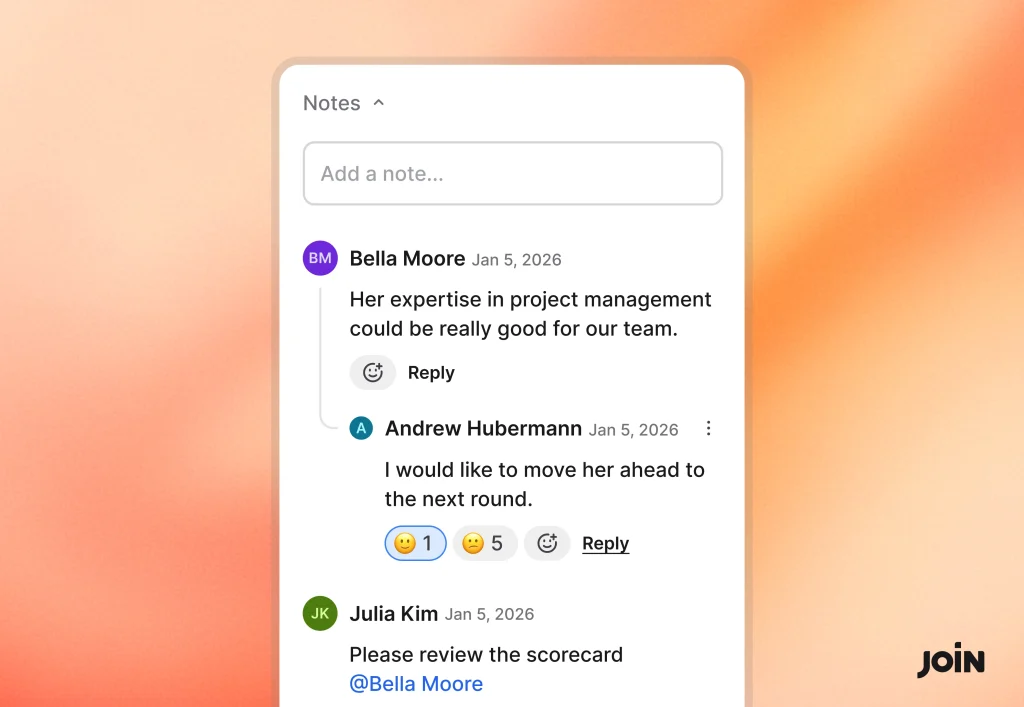
Interview notes recorded in isolation create gaps in the hiring process. When the next interviewer doesn’t have access to what happened in the previous conversation, they may ask the same questions, miss a red flag, or overlook something promising.
Centralised, structured notes change that. When every interviewer logs their feedback directly in the ATS the whole team can make informed decisions.
A structured note format worth standardising across your team:
- Overall impression: a 1–5 rating with a one-line summary
- Key strengths: 2–3 specific observations, not generalisations
- Areas of concern: anything that warrants a follow-up question or a conversation with the team
- Recommendation: a clear hire, no-hire, or “strong maybe with caveats” position
Short and specific is more useful than lengthy and vague. A note that reads “Strong communicator, gave a clear example of managing a difficult stakeholder in her previous role, worth exploring leadership potential” is far more actionable than “Good interview, seemed competent.”
In JOIN, you can use Notes to collaborate with your team and keep track of feedback and internal comments on candidates throughout the hiring process. For teams who want a closer look at how this works in practice, JOIN’s help centre covers the feedback and collaboration features in detail.
Sync your ATS with other tools to close collaboration gaps
Even a well-configured ATS can create friction if it operates in isolation. Many hiring decisions still happen in Slack channels, email threads, or calendar invites. Integrating your ATS with the tools your team already uses removes those silos.
The integrations that tend to have the biggest impact:
- Calendar sync: schedule interviews without switching between platforms or sending manual invites
- Email integration: candidate correspondence is logged automatically alongside their profile
- Job board publishing: post to multiple channels from a single interface and track source performance in one place
The goal isn’t integration for its own sake, it’s reducing the number of places where hiring information lives. When your ATS becomes the authoritative source of truth, decisions get made faster and with more confidence.
How JOIN helps you track, organise, and collaborate on every candidate
JOIN is designed for growing teams who need structure without complexity. The platform supports everything covered in this article, tagging and filtering, structured feedback, team collaboration, and workflow standardisation, all in one place. Recruiters can add notes and ratings visible to the whole hiring team, customise hiring stages, and stay connected through calendar and communication integrations.
For teams ready to move from a reactive inbox setup to a genuinely collaborative hiring system, JOIN’s recruitment features offer a practical starting point. The best hiring teams don’t just track candidates; they build systems that make every stage clearer, faster, and more consistent.
5 Tips to get more from your ATS candidate tracking
- Audit your current ATS setup to identify where notes, tags, and feedback are inconsistent or missing.
- Agree on a fixed tag library with your team before opening a single new role.
- Build stage-specific interview templates directly into your ATS to standardise evaluation criteria.
- Require structured feedback, including a rating and recommendation, from every interviewer, logged in the system.
- Connect your ATS to your calendar and communication tools to eliminate parallel workflows.
Frequently Asked Questions
The most effective strategies combine consistent tagging, structured feedback templates, and standardised stage workflows. These practices reduce manual effort and help teams surface the right candidates quickly, even when managing large pipelines. Integrating your ATS with scheduling and communication tools further reduces bottlenecks.
Interview notes are most useful when they follow a consistent format: overall impression, key strengths, areas of concern, and a clear hire or no-hire recommendation. Free-form notes are harder to compare across interviewers and often omit critical information.
Yes, when used consistently, tags allow recruiters to filter a large candidate pool in seconds rather than manually reviewing every profile. The impact is most significant in high-volume roles, where even small time savings across many candidates add up quickly.
Most teams adopt an ATS without establishing shared standards for how to use it. Without agreed conventions for notes, tags, and workflows, usage becomes inconsistent and the system’s value diminishes. A brief internal review and a short team alignment session can resolve most of these gaps.
Reducing friction is the most reliable approach. Make feedback forms short and structured, send automated reminders after interviews, and ensure managers can access candidate information without a complex login process. When the system makes their job easier rather than harder, adoption tends to follow.

Alana Barbosa
Alana is a creative member of JOIN’s Marketing team. As a Junior Marketing Specialist, she focuses on crafting engaging and insightful content that supports recruiters and job seekers alike. With a strong interest in storytelling and talent acquisition topics, Alana produces articles that inform, inspire, and reflect JOIN’s mission to make hiring smarter.